AI Generated Writeups Imported from Chat History
Project / / 1 min read
Mobile Linux virtualization with Termux and QEMU
Running Linux virtual machines on Android with Termux and QEMU, with a Portainer Agent connected over Tailscale.
Overview
I experimented with running full Linux virtual machines on an Android phone through Termux and QEMU. The guests included Debian and Alpine Linux on both ARM and x86 targets.
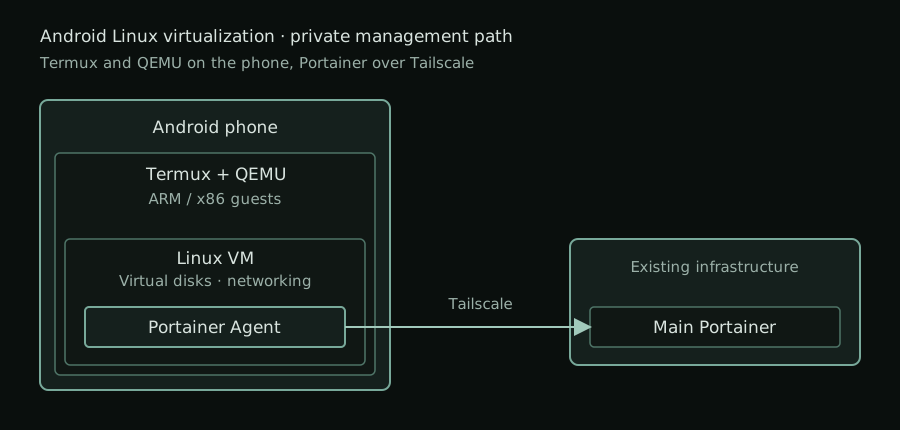
The project combines mobile Linux tooling, manual virtual-machine booting, virtual disks, and user-mode networking. I also got a Portainer Agent running on the environment and connected it to my main Portainer instance over Tailscale.
Virtual machine setup
The work included booting Linux kernels with an initramfs and kernel command-line parameters, using serial consoles, and installing operating systems without a graphical interface. I worked with QCOW2 and raw disk images, VirtIO devices, DHCP, and QEMU user-mode networking with host-port forwarding.
Portainer management
The environment runs a Portainer Agent that is connected to my main Portainer instance over Tailscale. This gives the mobile environment a private management path through the tailnet while keeping the agent separate from the main Portainer server.
Result
The experiment produced a usable Linux virtualization environment on Android and a way to manage its container workloads from my existing Portainer deployment. It also gave me practical experience with ARM and x86 guests, manual Linux boot parameters, virtual storage formats, and QEMU networking constraints on a mobile device.