AI Generated Writeups Imported from Chat History
Project / / 1 min read
Nextcloud private cloud
Hosting private file storage and collaboration tools with Nextcloud on local infrastructure.
Overview
I deployed Nextcloud to provide private file storage and collaboration tools on my own infrastructure. The service runs on a virtual machine and is made available through Cloudflare Tunnel.
The setup combines application configuration with Linux service administration, DNS, tunnel routing, and storage management. Nextcloud needs the public URL, trusted domains, and internal service route to agree with one another.
Deployment
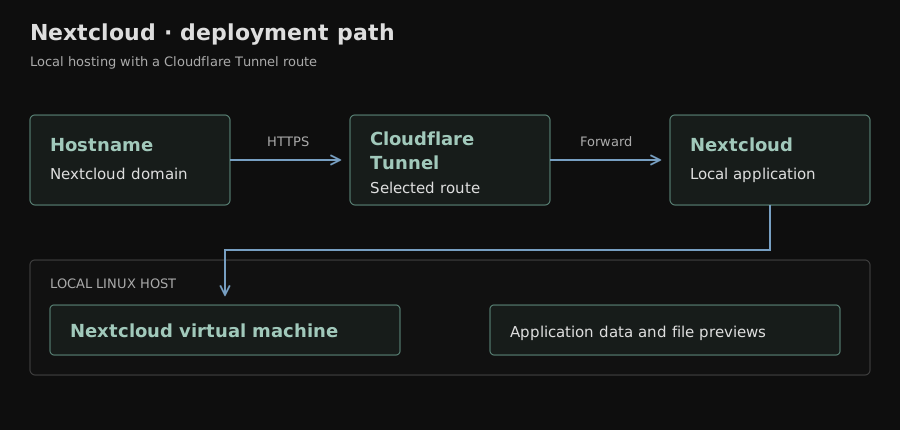
The deployment work included:
- Installing Nextcloud on a Linux virtual machine.
- Configuring the application for its domain and internal network address.
- Publishing the selected route through Cloudflare Tunnel.
- Checking the service locally before testing the public hostname.
- Configuring preview generation and the utilities needed for file previews.
Routing and troubleshooting
Some of the work involved separating application responses from tunnel responses. Untrusted-domain errors and HTTP 400 responses pointed to application URL configuration, while Cloudflare 522 responses required checking the path between the edge tunnel and internal service.
The service could be reachable from inside the network while still failing through its hostname. Checking the trusted-domain list, DNS, and tunnel connection independently made the route easier to verify.
I also investigated application warnings and preview-generation behavior separately from availability. A warning about a missing preview utility does not have the same cause as a request that cannot reach the application, so each needed its own check.
Result
Nextcloud provides a self-hosted private cloud for files and collaboration. The project demonstrates virtual-machine hosting, application URL configuration, Cloudflare Tunnel publishing, and layered web-service troubleshooting.