AI Generated Writeups Imported from Chat History
Project / / 2 min read
SysReptor security reporting deployment
Installing SysReptor locally with a dedicated Nginx Docker reverse proxy and hosts-file mapping.
Overview
I set up SysReptor as a locally hosted platform for creating structured security and CTF reports. The deployment uses the project’s installation script to configure the application and its supporting containers, then places a dedicated Nginx Docker container in front of it as a reverse proxy.
Installation
The installation was intentionally straightforward. I downloaded the SysReptor deployment files, ran the provided install script, and verified that the application and its supporting services started correctly. The script handled the Docker-based application setup, so I did not need to build each component manually.
After installation, I checked the local service from the host and confirmed that the web interface responded before adding the Nginx route.
Nginx reverse proxy
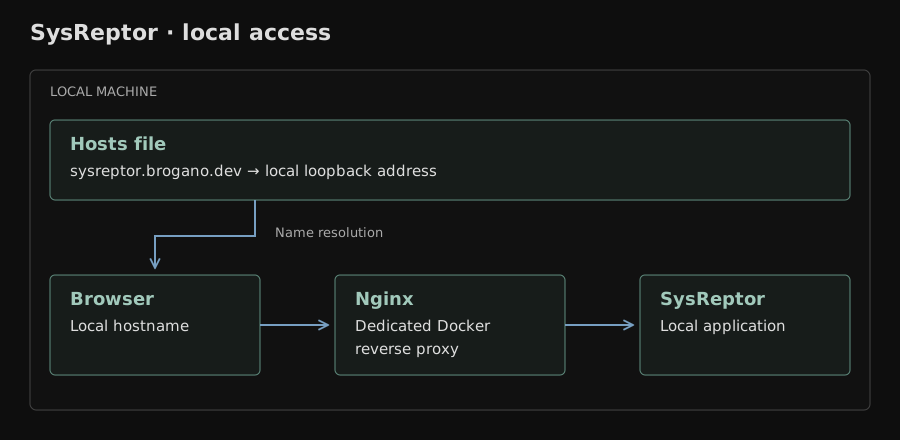
I created a separate Docker container running Nginx specifically for this service and configured it to accept requests for sysreptor.brogano.dev, then forward them to SysReptor. I added the domain alongside localhost in my hosts file so it resolves to the local machine.
The setup process was:
- Create an Nginx server block for
sysreptor.brogano.dev. - Run the reverse proxy in its own Docker container.
- Map the domain to the local loopback address in the hosts file.
- Configure Nginx to forward requests to the local SysReptor service.
- Start the Nginx container with the new configuration.
- Open the hostname in a browser to verify the local route.
This gives the application a stable local hostname while keeping the SysReptor service and reverse proxy separated into their own containers. Nginx handles the incoming request and forwards it to SysReptor, so the application does not need to manage the hostname itself.
Result
SysReptor is available locally at sysreptor.brogano.dev through the dedicated Nginx Docker reverse proxy. The project demonstrates a repeatable self-hosted deployment using Docker, a provided installation workflow, a hosts-file mapping, and a conventional Linux web-proxy configuration.